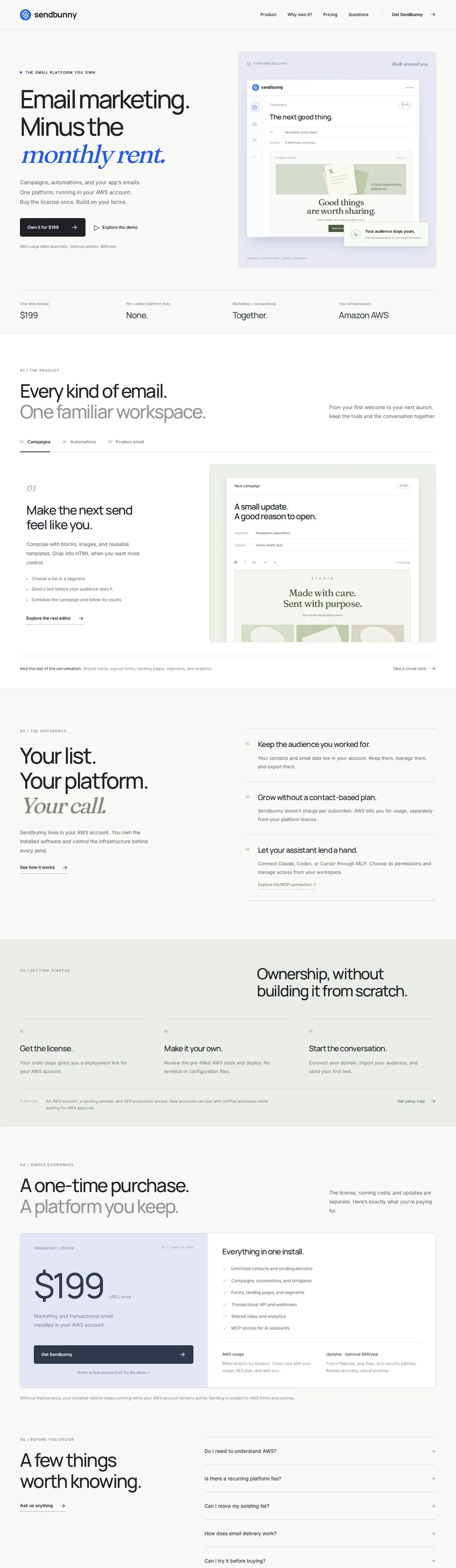
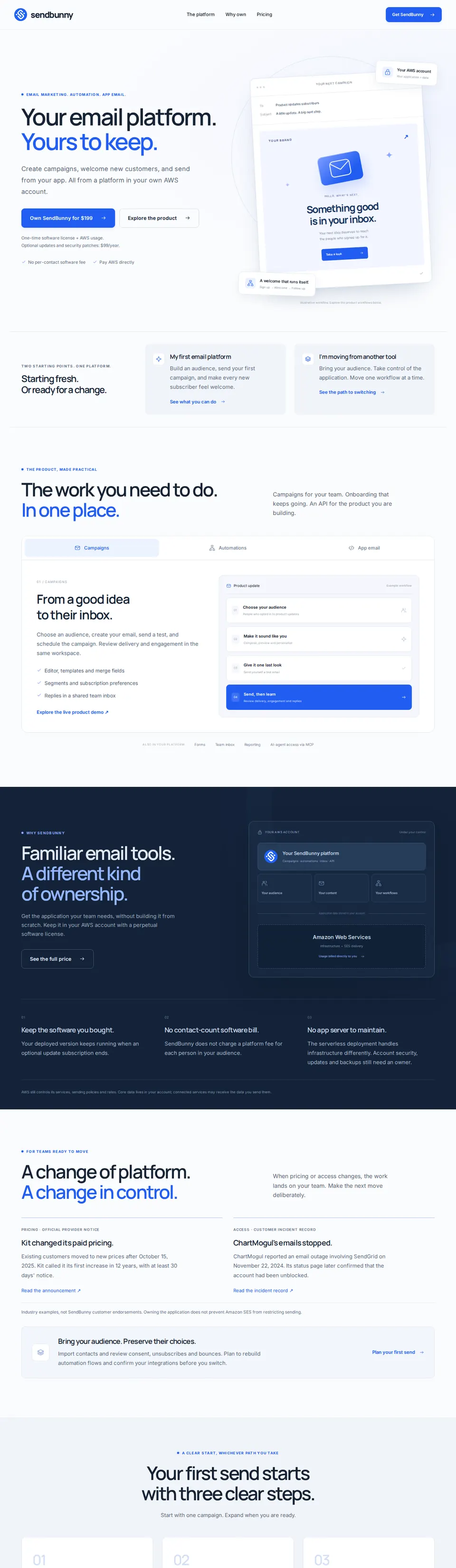
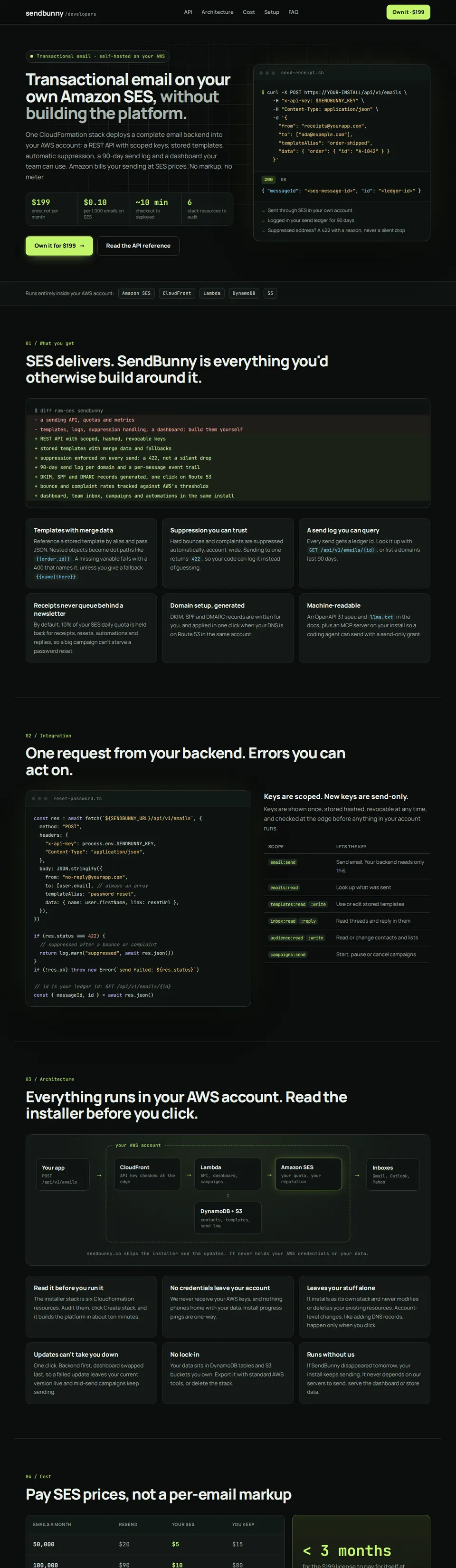
That’s the whole price for the software. After that, Amazon charges you about $1 for every 10,000 emails you send. No monthly plan. No price per contact.
June product updateDelivered 9,312Opens 4,102 (44%)Clicks 918 (10%)Summer sale: early accessDelivered 8,629Opens 4,877 (57%)Clicks 1,246 (14%)Onboarding drip #3Delivered 1,888Opens 1,141 (60%)Clicks 388 (21%)May newsletterDelivered 12,066Opens 6,218 (52%)Clicks 1,409 (12%)Click a campaign row to inspect it
Automations
Emails that send themselves, for example a welcome email when someone joins your newsletter.
New automation
AutomationOnIn it nowStarted
2121,284
48391
00
3640
Click an automation to see its steps and who is at each one.
Welcome seriesOnboarding new usersWin back quiet readersBirthday treatOnOffOnOffOnOffOnOff
When someone joins Newsletter, they get up to 3 emails over 5 days.When your app says “user_signed_up”, they get 2 emails over 3 days.When someone enters Not opened in 90 days, they get 1 email right away.On each person’s Birthday, they get 1 email at 09:00 in their time zone.
Send test
TriggerWhen someone joins Newsletter1,284 started · 212 in it now
1 · EmailSend “Welcome, {{name}}!”1,284 sent · 66% opened
2 · WaitWait 2 days96 waiting here now
3 · EmailSend “Getting the most out of Yourbrand”1,168 sent · 60% opened
4 · WaitWait 3 days110 waiting here now
5 · If / elseIf they clicked the second email402 yes · 638 noYes: set Plan to EngagedNo: send “In case you missed it”
TriggerWhen your app says “user_signed_up”391 started · 48 in it now
1 · EmailSend “Your account is ready”391 sent · 71% opened
2 · WaitWait 3 days48 waiting here now
3 · EmailSend “Three things to try this week”343 sent · 58% opened
TriggerWhen someone enters the segment Not opened in 90 daysOff
1 · EmailSend “We kept your seat warm”Not sent yet
TriggerOn the date in Birthday, every year640 started · 3 in it now
1 · EmailSend “A little something for your birthday”637 sent · 74% opened
Forms
Sign-up forms for yourbrand.co. Everyone confirms by email before they join.
New form
Newsletter footerSpring sale pop-upWebinar sign-upLiveLiveDraft
In-page formPop-up after 8 secondsIts own page and QR code
Edit form
Get the Yourbrand newsletter10% off your first orderSave your seatOne short email a week: new arrivals, price drops and tips. Unsubscribe any time.Join the list and we’ll email you the code today.Live on Thursday at 17:00. We’ll send the recording to everyone who signs up.EmailSubscribeSend me the codeSave my seatWe send a link to confirm. Unsubscribe any time.
Everyday website50 sign-ups a day from one connection
Events and shopsMany people on one Wi-Fi
Big announcementA bigger crowd for the next 24 hours
Your own numbersSet each limit yourself
Bot protection turns away scripts and known bad addresses before they reach your list. If confirm emails start bouncing, the form pauses itself and emails you.
Landing pages
A page of its own for one offer, with a form to collect emails, at go.yourbrand.co.
go.yourbrand.coNew page
Search pagesNewestGridList
Minus the monthly rentWinter Makers MeetupEmail marketing you ownStop paying per contactYours to keepEmail API for developers
Engaged, not on ProNot opened in 90 daysBig spenders
3,4121,284214 people · keeps itself up to date
Send a campaign
People on Newsletter where
Plan is not ProANDOpened any email · last 90 days
People on Everyone where
Did not open any email · last 90 days
People on Customers where
Amount spent is more than 500ANDCountry is one of UK, IE
Rules can ask about details, lists, topics, what people did with your emails and what they did in your app. Campaigns and automations use the segment as it is the moment they send.
Topic
Who gets it
Get it
Turned it off
NewsletterOur weekly newsletter
Everyone unless they turn it off
11,920
560
PromotionsSales and special offers
Everyone unless they turn it off
10,388
2,092
Product updatesWhat we shipped
Everyone unless they turn it off
12,204
276
Beta programmeTry new features first
Only people who turn it on
318
0
Readers switch each topic on or off from a preferences page with your logo, instead of unsubscribing from everything.
Field
Kind
Example
First name
Text
Maya
Company
Text
Acme Corp
Plan
Choice
Free, Starter, Pro
Country
Choice
UK, IE, SE, FR…
Birthday
Date
Jun 14
Amount spent
Number
1,240
Suppression
Addresses SendBunny will never send to: bounces, complaints, and manual blocks.
Email
Reason
Added
old-inbox@defunct-startup.com
Hard bounce
Jun 11
nolonger@retiredmail.net
Hard bounce
Jun 4
notinterested@bigco.com
Complaint
May 28
test@internal.example
Manual
May 12
Suppressed addresses are skipped automatically on every send to protect your sender reputation.
Sender identities
Domains you send from. DNS records are created for you.
Add domain
Domain
Status
DKIM
yourbrand.co
Verified
Ready
DEFAULT
mail.yourbrand.co
Verified
Ready
API keys
Keys for your own apps, and AI agents connected over MCP.
Connect an agentCreate key
HTTP API base URLhttps://app.yourbrand.co/api/v1Copy
Name
Key
Created
Last used
Production backend
sb_live_9f2k…
May 2
2 minutes ago
Staging
sb_live_x81m…
May 20
Yesterday
Agents can do everything this dashboard does: 182 tools, from building a segment to publishing a sign-up form, with the access you choose. Every tool says whether it reads, changes or deletes, so the agent asks you before it deletes.
Agent
Access
Last used
Last action
Claude Codeyourbrand.co · since Sep 4
Full
2 minutes ago
start_campaign “Win-back”
Disconnect
Codexyourbrand.co · since Sep 18
Inbox
Today, 08:10
reply_inbox to Jordan Park
Disconnect
Settings
Account, protection, and preferences.
Version 3.15.03.16.0
Theme
Colour theme and light or dark mode for this device.
LightDarkSystem
Indigo · Ocean · Emerald · Sunset · Rose · Violet
Email footer
Your name and postal address in every marketing email, the preferences page, and sign-up confirmation.
Company name
Yourbrand Ltd
Postal address
12 Market Street, Bristol BS1 4DJ, UK
Website
yourbrand.co
Goes in every marketing email with an unsubscribe link, as the law asks. Receipts and other API emails never wait for it.
SES account
Sending limits and production access for your AWS account.
Account
Production
Sent in the last 24 hours
9,840 of 50,000
Fastest sending rate
14/s
Amazon’s price plan
Essentials · $0.16 per 1,000 emails
Since July 2026 Amazon starts new accounts on Essentials, for extras SendBunny does not use. Switch to the standard price at once.Switch to $0.10 per 1,000
Data and storage
How long email events and the audit log are kept, and what that costs.
Keep email history (opens, clicks, bounces)
90 days
Keep the activity log
365 days
Record every open
Off
Stored today
304 MB · about $0.07 a month
Smart inbox
Sort arriving mail into folders you describe in one sentence.
Leads
Someone who might buy, or buy more: pricing, plans, moving their team over.
Support
A customer asking how to do something, or asking us to change something for them.
Billing
Invoices, receipts, refunds and payment questions.
Feedback
Praise, ideas and feature requests, with nothing urgent to answer.
Sorting uses your own typesafe.ai key: about four hundredths of a cent an email, with a monthly limit you set. Nothing is moved out of your inbox.
Protection
One monthly budget for public traffic, so bots can never run up your AWS bill. Your dashboard always stays up.
This month against the budget$0.42 of $20Emails at 50% and 80%.
Forms and links
Protected
Campaigns and automations
Never paused by public traffic
Unsubscribe links
Always work
Spending cap
Off
Webhooks
Tell your own apps the moment something happens to your email.
https://crm.yourbrand.co/hooks/sendbunnyActiveDelivered, Bounced, Opened, ClickedLast answer: 200 OK · 1 minute ago
https://hooks.zapier.com/hooks/catch/…ActiveUnsubscribed from allLast answer: 200 OK · yesterday
Signed in the Standard Webhooks format. If your app stops answering, events wait up to 14 days and go out as soon as it is back.
Updates
One-click updates run entirely in your AWS account. We never touch it.
Installed version
v3.15.0v3.16.0 up to date
Available updates
Checked against the public SendBunny release manifest
v3.16.0 is availableSee all your landing pages at a glance, and try each one before it goes liveUpdates included with your subscription
Updating to v3.16.0…
Downloading release
Deploying backend
Running migrations
Building dashboard
Publishing new version
The installer is running in your AWS account. Your current version stays live until the new build succeeds.
Update installed 🎉You’re on v3.16.0. That’s all there is to it: one click, no AWS console, no downtime.
How updates work
Clicking Update re-runs the installer inside your AWS account with the new release: backend first, then migrations, and the dashboard swap last, so a failure at any earlier step leaves your current version untouched.
No credentials ever leave your account.
This demo is live. Click anything
Your email bill this month
Old plan48,210 contacts$400.00
Amazon48,210 emails sent$4.82
Live activity
MLMaya Linopened
JWJonas Weberclicked
PSPriya Shahreplied
Inbox delivery
Reachyourcustomers’inbox.Nottheirspamfolder.
Amazon SES
The same sending network big brands trust
Your emails go out through Amazon SES, the email service inside AWS, with your name and your domain on them. SendBunny handles the setup.
Passes the sender checks inbox providers require (SPF, DKIM, DMARC)
One-click unsubscribe in every email, as inbox providers require
Bounced and complained addresses are taken off your list for you
New domains warm up slowly, so inboxes learn to trust you
A health check shows your bounce and spam rates before they become a problem
Staying in the inbox is simple. Send to people who asked to hear from you. That’s what keeps any sender in the inbox, here or anywhere else. A bought list gets paused by every email service, AWS included.
yourbrand.comSending healthHealthy
DKIMVerified
SPFPass
DMARCPass
Bounce rate0.6%
Complaint rate0.02%
Features
All the features. No upgrades to unlock.
Other email tools lock their best features behind pricier plans. SendBunny gives you every feature from day one, for one price.
Campaigns
Write it like a doc. Watch it land live.
A Notion-style editor with slash commands, or raw HTML. Delivered, opened and clicked stream in as they happen, down to each recipient’s timeline.
WriteHTMLPreviewSaved
October product update
Hi Maya, three things shipped this month that you asked for.
/call
Blocks
Callout↵
Heading
Button
Image
See what’s new
Live
Delivered24,906
Opened12,752
Clicked2,092
JW
jonas@example.comDelivered 09:00 · Opened 09:04 · Clicked 09:05
Automations
Onboarding that sends itself.
Start on a list join, a date or an event from your app. Branch with If / else and A/B tests. No higher tier to unlock.
Joins “Trial users”Trigger1,204
Send “Welcome aboard”Email1,204
Wait 2 daysDelay
Activated?If / else
Yes
“3 power tips”812
No
“Need a hand?”392
Trial to paid31%
Team inbox
Replies land where you’ll read them.
Every reply threads into a shared inbox at your domain, checked for spam and viruses.
Re: October product update
Spam check passedVirus scan clean
ML
Maya LinLove the new export. Can it do CSV as well?
YouYes! CSV shipped on Tuesday. Here’s how to turn it on.
Transactional API
Receipts and resets, same place.
One POST sends a stored template with your data, from the same domain and suppression list.
Combine fields, lists, tags and engagement. People move in and out as they change.
PlanisPro
and
Opened any emailin the last30 days
and
Tagis notchurned
3,402 people matchUpdates as people change
Deliverability
Built to reach the inbox.
DKIM, SPF and DMARC set up, one-click unsubscribe, bounces suppressed and Gradual Send to warm new domains.
DKIM
SPF
DMARC
One-click unsubscribe
Bounce rate0.6%
Amazon reviews accounts at 5%
Complaint rate0.02%
Amazon reviews accounts at 0.1%
Import
Bring your whole list.
Drop your old tool’s export as it came. Anyone who said no stays a no.
MMailchimp
KKit
BBrevo
MMailerLite
KKlaviyo
AActiveCampaign
CConstant Contact
HHubSpot
SSendGrid
PPostmark
or any spreadsheet
ZIP
mailchimp_export.zipDropped as it came
48,210subscribers
1,930unsubscribes kept
512bounces suppressed
Landing pages and forms
Your pages and forms, on your own domain.
Build landing pages and sign-up forms in SendBunny, then publish them at an address you own, like go.yourbrand.com. Any page can be your home page, and everything is served from your own AWS account.
Views and sign-ups for every page
Bot checks and confirm emails on every form
Flat-price hosting with no overage charges
go.yourbrand.com/workshop
Free workshop · Nov 14
Ship your first automation in 30 minutes
A live session for teams leaving per-contact pricing.
you@company.comSave my seat
No spam. Unsubscribe any time.
go.yourbrand.comCustom domainLive
DNS recordChecking…Found
HTTPS certificateRequesting…Issued
PageViewsSign-ups
/workshop2,184412
/launch5,930861
/newsletter1,027305
Also in every license
Sign-up forms with bot checks
Surveys and quizzes
Subscription topics
Unlimited domains
Webhooks
A/B tests
Scheduled sending
Team roles
Audit log
Image library
Built-in MCP server
Let your AI agent run the email.
Connect Claude, Codex or Cursor over MCP. 158 tools cover everything in the dashboard, and you decide what each agent may touch.
You set the limitsSend mail, Inbox or Full access, per domain. Disconnect any time.
It checks before deletingEvery tool says whether it reads, changes or deletes.
Nothing off the recordEach change shows up in your dashboard and activity log.
$ claude mcp add --transport http sendbunny \
    https://YOUR-INSTALL/api/mcp
claude · ~/yourappsendbunny connected
>Email every Free user who joined in the last 30 days an upgrade offer. Send me a test, then schedule it for Thursday at 10:00.
list_segmentsreadsNo segment for that yet
create_segmentchanges“Free, joined in 30 days” · 1,284 people
create_templatechanges“Your team, on Pro”
create_campaignchanges“Upgrade offer” · draft
test_campaignchangesTest sent to you@yourapp.com
start_campaignchangesScheduled for Thursday 10:00
Done. Your test is in your inbox, and 1,284 Free users get “Your team, on Pro” on Thursday at 10:00.
Setup
Installed in ten minutes. No tech knowledge needed.
Three clicks and you own your email platform.
Order confirmed
SendBunny license$199.00
Deploy to AWS
Step 01
Click “Deploy to AWS”
Check out with your email. Your order page opens your own AWS console with everything filled in.
sendbunny-installerus-east-1
CREATE_IN_PROGRESSCREATE_COMPLETE6 resources
Step 02
Click “Create stack”
The only thing you do in AWS. Six readable CloudFormation resources, which you can audit first, build SendBunny inside your account.
Your SendBunny is readySign in to mail.yourbrand.com
Open my dashboard
Step 03
Open your email
A magic link signs you in to your dashboard at your own address. It’s yours from that moment.
How you pay
Buy the software. Pay for what you send.
A subscription bundles software and services into one bill. SendBunny separates them. You buy once, then pay AWS directly for usage.
YOUR COPY OF THE PLATFORM
Pay SendBunny once.
OnceOne-time license
$199once
Your software and audience data live in your AWS account. No SendBunny fee based on how many contacts you keep.
YouSendBunnyOne purchase
Your AWS accountOwner: you
Your audienceYour account
Your campaignsYour account
Your repliesYour account
YOUR USAGE BILL
Pay AWS for sending.
$1per 10,000 emails
$10per 100,000 emails
$100per 1 million emails
AWS SES handles email sending. You pay AWS directly, with no SendBunny sending markup.
YouAWSActual usage
SendingAWS SES base rate
SendBunny markup$0
Hosting & other AWS servicesExtra
What else do I pay? Optional software updates: $99/year. Landing pages with sign-up forms: $15/month to AWS.
About the AWS sending rate
Examples use AWS SES à la carte pricing at $0.10 per 1,000 emails. New accounts start on a higher-priced plan and can switch to à la carte. Hosting, data, incoming email, and optional services add charges. See AWS pricing
The math
Pay per email, not per contact.
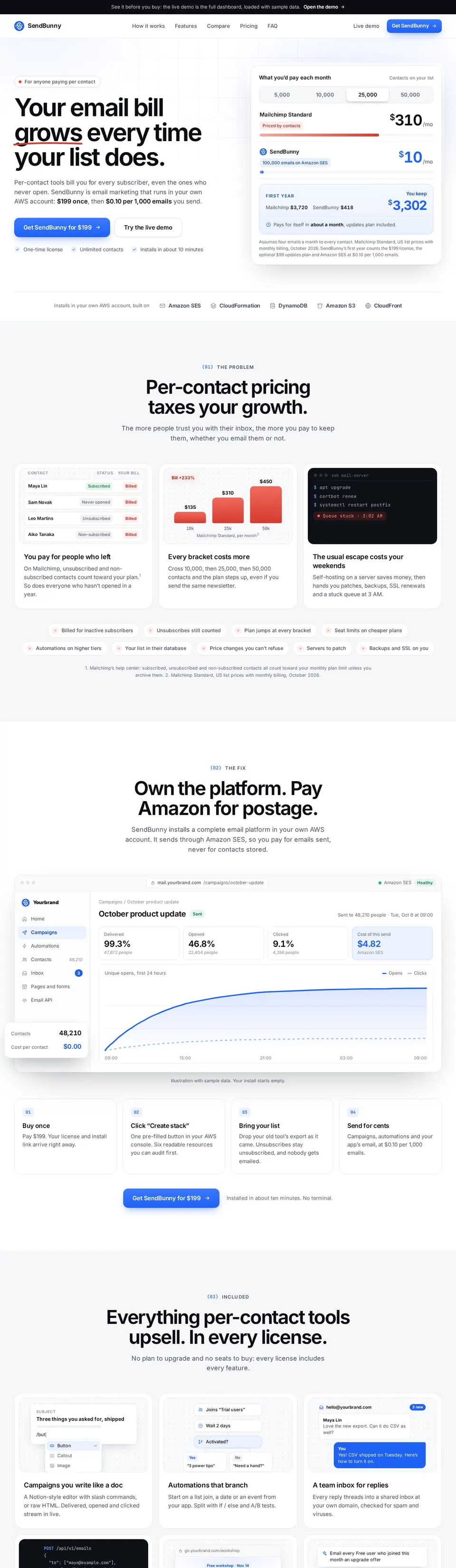
Per-contact pricing charges rent on every subscriber, every month, including the ones who never open. SendBunny costs $199 once, and Amazon charges $0.10 per 1,000 emails you actually send.
Monthly cost, emailing every contact four times a month
Mailchimp StandardPriced by contacts
$135$310$450/mo
SendBunny on Amazon SES40,000 emails100,000 emails200,000 emails
$4$10$20/mo
First year
Mailchimp$1,620$3,720$5,400
SendBunny$346$418$538
You keep$1,274$3,302$4,862
Mailchimp Standard list prices, billed monthly, checked March 2026. SendBunny’s first year counts the $199 license, the optional $99 maintenance plan and Amazon SES at $0.10 per 1,000 emails. New AWS accounts start on Amazon’s $0.16 Essentials rate; the app switches you in one click.
Cost control
No surprise bills. You set the budget.
Sending costs exactly what you send. The traffic you don’t control, from bots on your forms to a flood of clicks, runs on a monthly budget you set.
Traffic budgetChecked every 5 minutes
$4.80of $20 used this month
Monthly budget$20Any amount, $1 to $10,000
50%Email80%Email$20Safe mode
This month, place by place
Sign-up forms$2.10
Opens and clicks$1.62
Incoming mail$0.71
Unsubscribe and app links$0.37
Unusual trafficFlag it at this many times your usual
3×5×10×
Every 5 minutes
Unusual traffic gets flagged
Pick what counts as unusual: 3, 5 or 10 times your normal traffic. You see the top addresses behind it and a suggested fix.
At 50% and 80%
You get an email
Plenty of warning to raise the budget or look into what’s happening.
At 100%
Safe mode switches on
Sign-up forms, new app connections, mail sorting and open and click counting pause until the month ends or you raise the budget.
In Safe mode
The essentials keep running
Your dashboard, campaigns, API sending, inbox and unsubscribe links carry on as normal.
Sending costs what you sendAmazon charges $0.10 per 1,000 emails, and only for mail you choose to send.
Pages at a flat monthly priceLanding pages run on Amazon CloudFront’s flat-rate plans: free for pages, $15 a month once a page has a form. Amazon charges no overages, even if a page goes viral.
Pricing
Pay once. Own it for good.
One license with every feature. Unlimited contacts, emails and domains. Amazon bills your sending directly, at cost.
Everything, in every license
Unlimited emails, contacts and domains
Campaigns, templates and automations
Segments and subscription topics
Landing pages and forms on your domain
Surveys and quizzes
Team inbox to send and receive
Transactional API and webhooks
MCP server for AI agents
Import from any email tool
Real-time analytics
Monthly budget with Safe mode
One-click deploy into your AWS
SendBunny licenseLifetime
$199one time
The full platform, deployed in your own AWS account and yours for life.
Maintenance plan, optional$99 a year
Updates, bug fixes, security patches and new features, one click from your dashboard. Cancel any time and your install keeps running.
Yes. Self-hosted means it runs on infrastructure you own, and SendBunny runs entirely inside your own AWS account: Amazon SES sends, DynamoDB and S3 store your data, CloudFront serves your dashboard. Serverless just means Amazon runs the machines, so there’s no box for you to patch, size or restart.
Do I need to know AWS?
No. You click one pre-filled “Create stack” button in the AWS console and the installer does the rest. Updates are one click inside your app. You never touch a terminal or write configuration.
What will it cost to run?
Amazon bills you directly: about $0.10 per 1,000 emails, plus a few cents of serverless infrastructure at higher volumes. If you send nothing, you pay about nothing. New AWS accounts start on Amazon’s $0.16 Essentials plan, and the app shows your plan and moves you to the $0.10 rate in one click. Landing pages with a sign-up form add Amazon CloudFront’s $15-a-month flat-rate plan.
Could I get a surprise AWS bill?
SendBunny is built to prevent one. Sending costs exactly what you send, about $0.10 per 1,000 emails. Everything outsiders can trigger, like sign-up forms, opens and clicks, incoming mail and unsubscribe links, runs on a monthly budget you set, anywhere from $1 to $10,000 ($20 unless you change it). You get an email at 50% and 80%. At 100%, Safe mode pauses forms, new app connections, mail sorting and open and click counting until the month ends or you raise the budget, while campaigns, API sending, the inbox and unsubscribes keep working. Landing pages run on Amazon CloudFront’s flat-rate plans, which have no overage charges.
How is this different from Sendy or Listmonk?
The sending costs are the same, because all three use Amazon SES. The difference is the server: Sendy and Listmonk need a VPS you install, secure, back up and scale, so the cheaper software comes with a monthly server and your hours. SendBunny installs as a serverless stack in your AWS account and adds branching automations, a team inbox, a transactional API and an MCP server for AI agents.
Will my emails reach the inbox?
Sending runs on Amazon SES, which is strict about who sends so its addresses stay trusted. SendBunny sets up DKIM, SPF and DMARC, adds one-click unsubscribe, suppresses bounces and complaints automatically, warms up new domains with Gradual Send, and shows your rates against Amazon’s limits.
When can I send my first campaign?
The install takes about ten minutes. New AWS accounts start in Amazon’s SES sandbox, which only delivers to addresses you have verified, so you can set everything up and send tests right away. The app links you to Amazon’s production-access form, which mostly asks about your website and list.
Can I bring my list from Mailchimp, Kit or Loops?
Yes. Drop your old tool’s export as it came: a ZIP, CSVs, an Excel workbook or JSON. Subscribers, unsubscribes, bounces, lists, tags and fields land where they belong, and anyone who said no stays a no. Automations don’t transfer, so plan an afternoon to rebuild your key sequences, or ask your AI agent to do it.
Can I put landing pages and forms on my own domain?
Yes. Connect a domain you own, like yourbrand.com or go.yourbrand.com. Each page lives at its own address, such as go.yourbrand.com/webinar, any page can be your home page, and everything is served from your own AWS account with views and sign-ups tracked per page. Pages without a form run on Amazon CloudFront’s free flat-rate plan. Once a page has a form it needs the $15-a-month Pro plan, which you approve in the dashboard.
What happens if SendBunny shuts down?
Your platform keeps running. It lives entirely in your AWS account and never depends on our servers to send, show your dashboard or store your data. The only thing that would stop is updates.